Dataro Agent Technical Details
Last updated: September 22, 2026
Export Formats
Results can be exported as either zipped CSV files (using --format csv) or Parquet files with gzip compression (using --format parquet). N.b. CSV exports will be deprecated in future.
Database Accounts
A database account (as opposed to Windows Authentication) is required for scheduled operation.
It is the client's responsibility to ensure that the database account has only select privileges on the required tables.
Installation Instructions
Dataro will provide a zip file containing:
dataro_agent.exe
dataro_queries.sql
dataro_sftp.key
config.ini
Unzip these files into a directory accessible to the user who will own the scheduled tasks i.e. C:\dataro. We will call this the 'working directory'.
Edit the config.ini to include the database host, name, username and password. We suggest that you encrypt the database username and password using the method described below.
Open a command window and navigate to the working directory.
Run the following command to confirm that the agent is configured correctly:
dataro_agent.exe --mode export --config_file config.ini --key_file dataro_sftp.key --query_file dataro_queries_test.sql --format csv --scheduled FalseIf the program completes without issue, then proceed to setting up for Scheduled Operation.
Scheduled operation
Typically the agent will be scheduled using Windows Task Scheduler.
Export
dataro_agent.exe --mode export --config_file config.ini --key_file dataro_sftp.key --query_file dataro_queries.sql --format csv --scheduled TrueTriggers
On a schedule
Daily
Every 1 Day
(Time is as per client's requirements)
Actions
Start a Program
Program/Script: C:/dataro/dataro_agent.exe
Add Arguments: --mode export --config_file config.ini --key_file dataro_sftp.key --query_file dataro_queries.sql --format csv --scheduled True
Start in: C:/dataro/Import
dataro_agent.exe --mode import --config_file config.ini --key_file dataro_sftp.key --scheduled TrueTriggers
On a schedule
Daily
Every 1 Day
(Time is as per client's requirements -- approximately. 3 hours after the export)
Actions
Start a Program
Program/Script: C:/dataro/dataro_agent.exe
Add Arguments: --mode import --config_file config.ini --key_file dataro_sftp.key --query_file dataro_queries.sql --format csv --scheduled True
Start in: C:/dataro/Encrypting values in the .ini file
We suggest that you encrypt data such as database password before storing in the ini file.
The Agent has built-in functionality to encrypt strings and decrypt encrypted values in the ini file.
The example below demonstrates how to encrypt a database password and save in the ini file.
dataro_agent.exe --enc MySecretPassword123This will generate some logs in the console, look for one like 'This is the encrypted text':

Copy the string starting from (and including) 'enc_' and paste this into the config file:
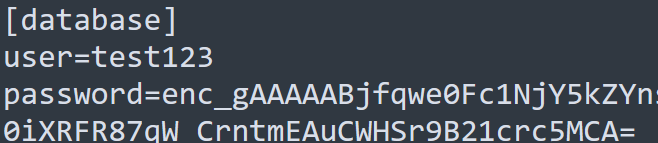
Now, when you run the agent normally, it will identify an encrypted string by the 'enc_' starting characters and decrypt the value inside the program.
CLI Arguments
optional arguments:
  -h, --help            show this help message and exit
  --config_file [CONFIG_FILE]
                        Config file name
  --key_file [KEY_FILE]
                        SFTP Private Key File
  --query_file [QUERY_FILE]
                        Dataro SQL File
  --copy_only [COPY_ONLY]
                        Only do sftp copy
  --scheduled [SCHEDULED]
                        Don't require key return at the end.
  --mode [MODE]         Export or Import data
  --format [FORMAT]     csv or parquet data
  --db_update_script [DB_UPDATE_SCRIPT]
                        Filename of custom script to synchronise database
  --enc [ENC]           Encrypt a string for usage in ini files