Extracting Predict scores on Blackbaud CRM
Last updated: September 22, 2026
The time has come to build your DM Appeal using Dataro’s machine-learning models. Within BBCRM there are many ways to accomplish the same task. In this guide, we are going to cover two methodologies around Marketing Efforts and one for Appeal Mailings.
While this example is specific to appeals, it's easy to do the same thing with our other propensities. Simply use the relevant field to filter for what you are looking for.
In these examples, we're going to create a mail file containing about 5000 records. Dataro provides a recommended campaign size for . To increase the mailfile size, simply increase the number of selections using Dataro DM Appeal Rank Attribute to match your desired file size.
Sometimes a donor may be unlikely to give, but, if they do give, may give a larger gift. To try to capture these edge cases, we supplement our query with Dataro DM Appeal >$500 Rank. This should normally be about 10% of the list size. So in these case we have also selected everyone whose Dataro DM Appeal >$500 Rank is less than or equal to 500.
Marketing Efforts - Dataro Segment
In BBCRM create a new segment by going to Marketing and Communications -> Segments -> Create new Constituent segment
Fill out the segment Details as per your team's requirements
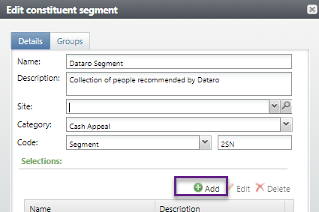
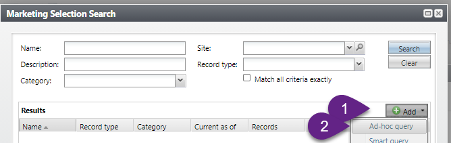
Add selection -> Add -> Ad-hoc Query -> Constituent Query
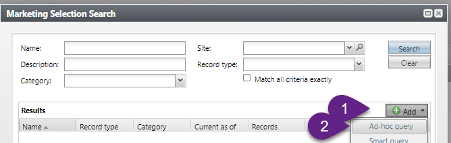
In the new Query you have started Filter records for:
Dataro DM Appeal Rank Attribute\Value is less than or equal to 5000
Dataro DM Appeal >$500 Rank Attribute\Value is less than or equal to 500
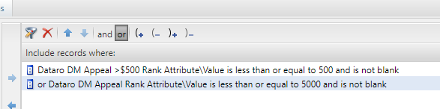
Save and name the query as per your business requirements
Add this segment to your normal Marketing Efforts process either stand-alone (if targeting only Dataro-identified constituents) or in addition to your normal segmentation model
Use your Universe and Exclusion criteria as per normal
Marketing Efforts - Universe
Create a Marketing Effort using your existing Templates
Add a segment of all mailable people, or use your pre-existing Segmentation model
Add a universe query that is restricted to Dataro selections
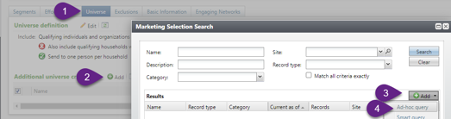
DM Appeal Attribute\Value is greater than or equal to a particular score (e.g. 0.05)
Dataro DM Appeal Rank Attribute\Value is less than or Equal to 5000
Dataro DM Appeal >$500 Rank Attribute\Value is less than or Equal to 500
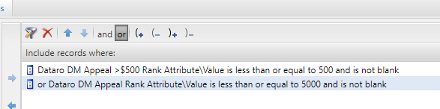
Save and name the query as per your business requirements
Use exclusions as per your business requirements
For full instructions on Marketing Efforts please see the Blackbaud Guide.
Appeal Mailings
CRM -> Marketing and Communications -> Appeal Mailings
Complete as per your business requirements
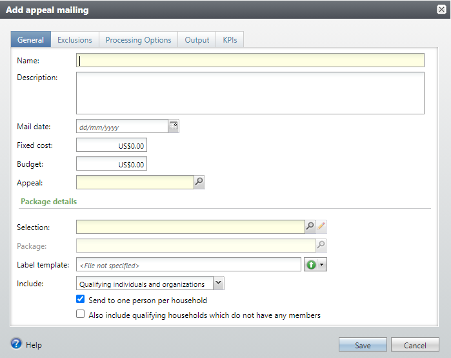
In the selections create a new Ad-hoc Query. In the new Query you have started Filter records for
DM Appeal Attribute\Value is greater than or equal to a particular score (e.g. 0.05)
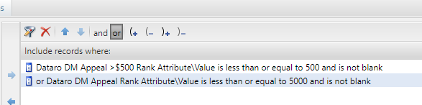
Dataro DM Appeal Rank Attribute\Value is less than or equal to 5000
Dataro DM Appeal >$500 Rank Attribute\Value is less than or equal to 500
Add exclusions as per your business requirements. Take note that only solicit code exclusions can be entered here. So any additional exclusions (i.e missing address) should be added to the Dataro Selections query
Continue with Appeal Mailing activation and export as required