Your homepage in four tabs
Last updated: October 8, 2026
The four tabs on your homepage give you four ways to start a piece of fundraising work.
Your Dataro homepage has four tabs across the top, and each one is a different starting point for the work you came to do. You do not need to work through them in order, and any of the four is a reasonable place to begin.
Open app.dataro.io/v3 and the tabs are the first thing you see.
The four tabs, and when to use each
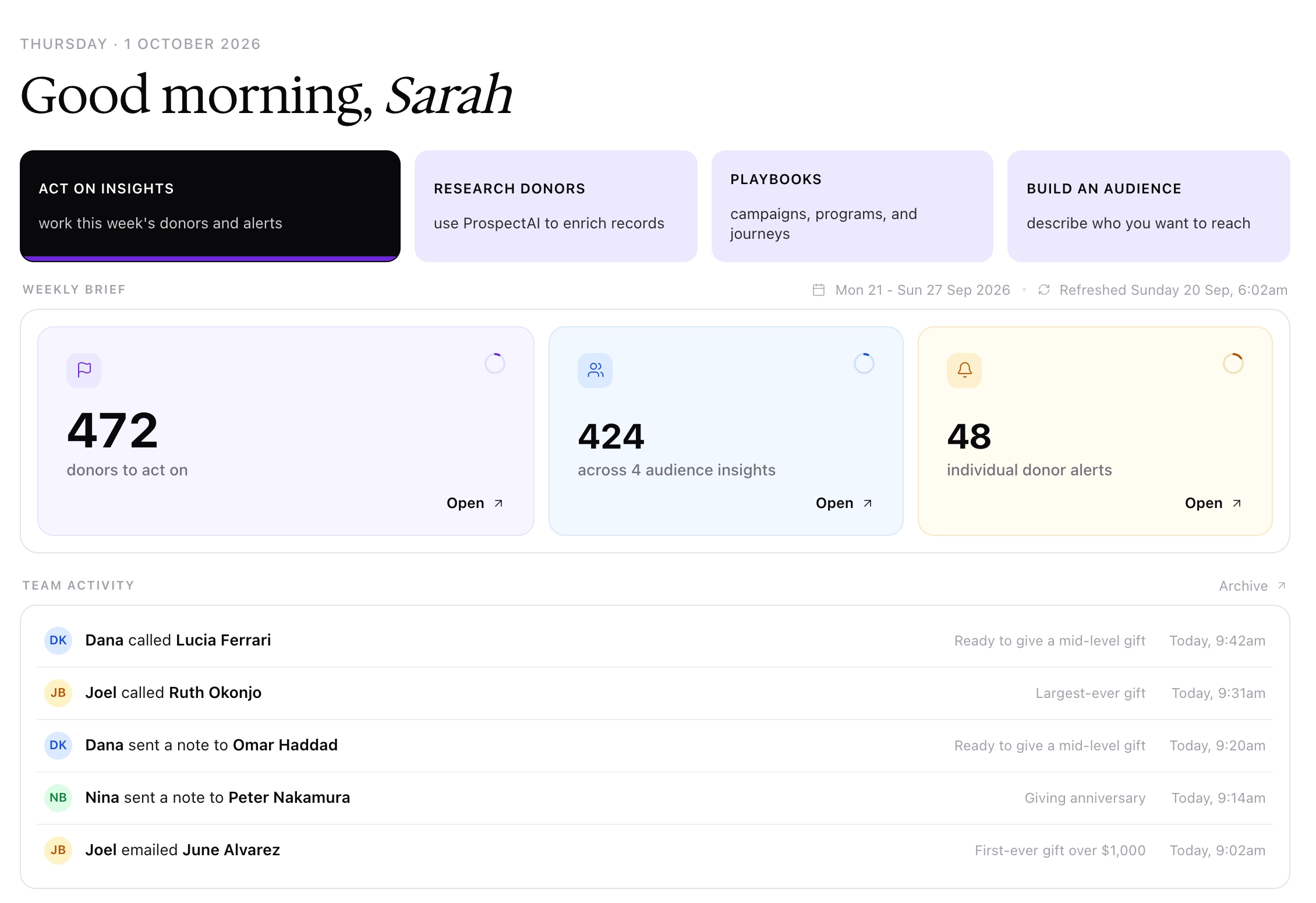
Act on Insights shows this week's insights at a glance. The Weekly brief counts the donors waiting for an action, split into audience insights and individual donor alerts, and Team activity lists the latest actions your colleagues recorded. Click Open on any count to work through the donors in Action Tracking.
Research Donors is for looking into individual donors rather than building a list you are about to mail. Use it when the unit of work is a person.
Playbooks is for when you already know which campaign you want to run. You pick the play, and Dataro assembles the audience and content around it.
Build an Audience is for when you already know exactly who you want and would rather go straight to the filters. It is the quickest route when you have a specific list in mind.
Note: The Research Donors tab appears only if your organization has ProspectAI enabled and Dataro holds donor contact details from your CRM. Both are set for your whole organization. If either is missing, the tab is hidden and your homepage shows three tabs.
Frequently asked questions
I don't have the Research Donors tab. Why not?
Two things have to be true for the tab to appear, and both are set for your whole organization: ProspectAI has to be enabled for your account, and Dataro has to hold donor contact details from your CRM. Research works from a donor's name and location, so an account without donor contact details has nothing to search on. The tab is hidden rather than grayed out, so there is nothing on your homepage to indicate which one is missing. Your Customer Success Manager can tell you which applies.
Do I have to use the tabs in a particular order?
No. They are four independent entry points into the same platform, not four steps in a sequence. Pick the one that matches what you want to do.
What are Playbooks?
Playbooks are pre-made audiences based on our models, so starting a new campaign or program is always only 3 clicks away. You can edit the audiences, send directly to your CRM or export in your desired format.
Where do the audiences from an insight or a playbook end up?
On the Audiences tab of the Audiences page. Open Audiences from the sidebar and use the Type filter to show Insight or Playbook audiences. Anything Dataro built for you is listed there.
Where do I record what I did about an insight?
In Action Tracking. Click Open on any count in the Weekly brief, or open Insights from the sidebar, then record an action for each donor you contact. See 📄 Act on Insights and Action Tracking.
Can I get to my saved audiences from here?
Yes, though the homepage is for starting work rather than storing it. Your audience library lives on the Audiences page, reachable from the sidebar.
Related articles
What Dataro 3.0 does for the platform overview and the terms we use
What refreshes and when for why the insight count moves week to week
The Audiences page for where audiences live once they exist