Next One-Time Gift Playbook
Last updated: October 22, 2026
Dataro's Next One-Time Gift ranks and scores help you find the donors most likely to give a single gift across your appeals, journeys, and digital campaigns.
What is Dataro's Next One-Time Gift propensity?
Objective: Identify which of your active donors are most likely to make a single (non-recurring) gift in the next 3 months, across any channel or campaign category.
Output: Next One-Time Gift Rank (1 = most likely) and Next One-Time Gift Score (e.g. 0.5 = 50% likely).
Model definition: All contacts with at least 1 previous contribution. The model predicts whether a donor gives at least one single gift of $10/£10 or more in the next 3 months.
What makes this model different: The model is channel- and category-agnostic by default, so it works without any campaign tagging. If you have tagged your channels and categories, you can also narrow predictions to a specific channel (e.g. email only or online only) without needing a separate model.
When should you use the Next One-Time Gift model?
The Next One-Time Gift model is built for:
Email appeals and nurture journeys
Digital appeals, including paid media audiences and online forms
Multi-channel single gift campaigns where you want one ranked list
A baseline donor propensity if you don't yet have channel tagging in place
Note: The Next One-Time Gift model has a setting that lets you filter to direct mail appeals only. For direct mail campaigns, we recommend using Dataro's DM Appeal Rank, which is purpose-built for that channel.
What is your next gift objective?
Your goal shapes how you use the Next One-Time Gift ranks and scores. Like other Dataro propensities, ranks let you prioritize your donors from most to least likely to give.
If your goal is to improve conversion in existing appeals, use Next One-Time Gift to narrow your existing selection criteria or prioritize digital audiences.
If your goal is to launch a new digital appeal or nurture journey, use Next One-Time Gift as your primary selection criterion.
How do I create a Next One-Time Gift audience in Dataro?
Here's how you'll do it step by step:
Log in to the Dataro app.
Go to Donors & Audiences > Audience Builder.
Click Filter in the top right corner.
Add a filter for Next One-Time Gift ranking is less than or equal to your planned campaign size. This is your base list of donors most likely to give a single gift in the next 3 months.
Apply exclusions based on your outreach strategy. Standard exclusions include:
Bounced or unsubscribed email addresses (for email campaigns)
Donors already in another live campaign
Active recurring donors (if you are targeting single gift donors only)
Major donors managed by your philanthropy team
Click Save filters.
Update the columns to include Next One-Time Gift Rank and Next One-Time Gift Score, alongside other helpful attributes such as last gift date, last gift amount, and preferred channel.
Click Save audience and give it a name your team will recognize.
Update your data brief with your new selection criteria.
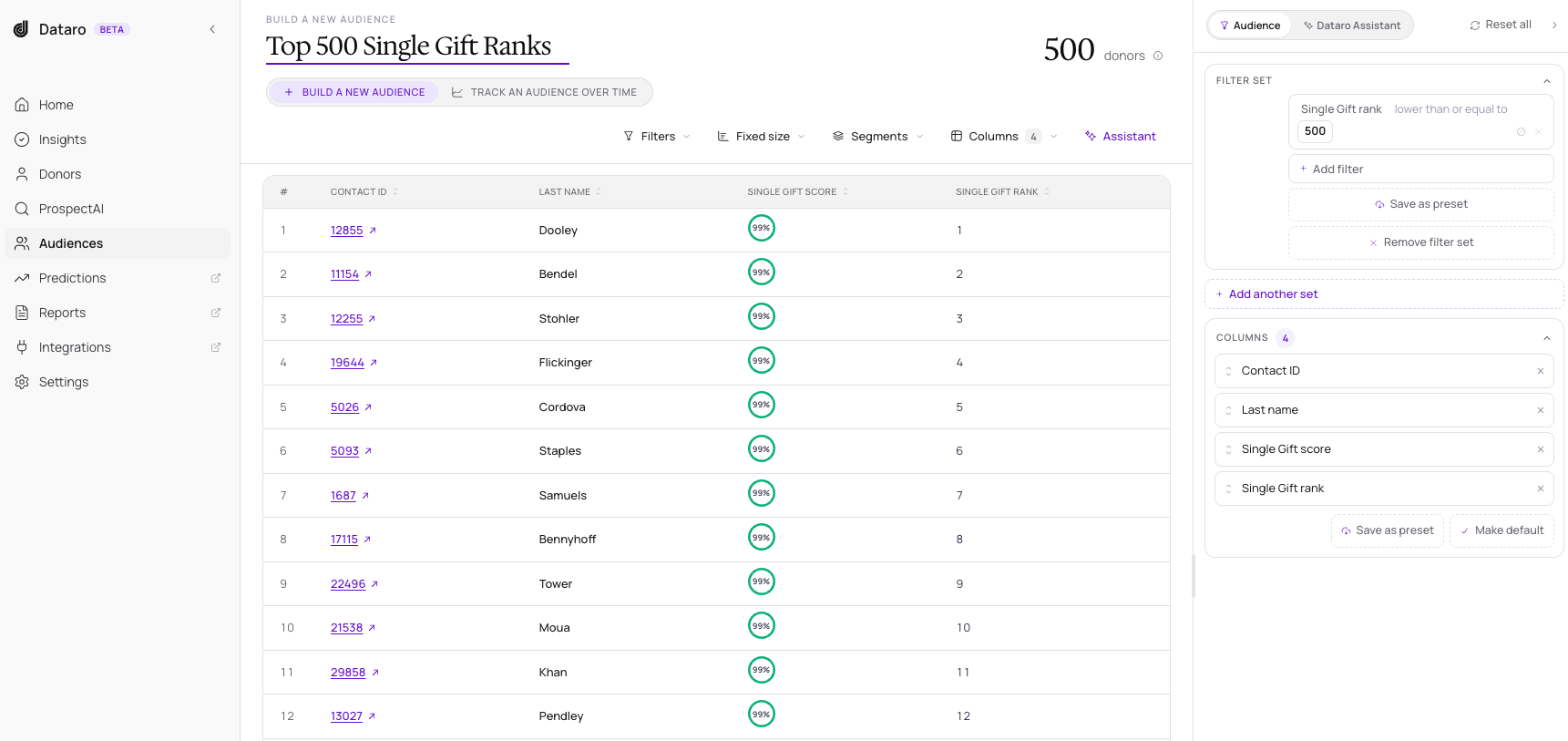
Note: If you access Dataro ranks through your CRM, use the Dataro Single Gift Rank field and follow the same approach.
How do I filter predictions to a specific channel or category?
By default, Next One-Time Gift predicts across all channels and categories. If you would like predictions tuned to a specific channel (e.g. Email) or category (e.g. Year-End Appeal), here's how:
Go to Model Performance.
Find the Next One-Time Gift section.
Click Edit.
Choose your channel and/or category filter.
Click Submit.
Predictions refresh on the next data run, typically within 7 days. After that, the Next One-Time Gift Rank and Score in Audience Builder reflect the filtered view.
Note: Channel and category filters only work if you have channel and category tagging in place. Model settings apply to your whole account, so if you change them, everyone on your team sees the new predictions.
Which channels does the Next One-Time Gift model work best for?
Email appeals and nurture journeys: The Next One-Time Gift model performs strongly here. We recommend using it as your primary propensity for email appeal selections, broadcast emails, and triggered journeys.
Digital appeals (online forms, paid media): Performance is strong. Use Next One-Time Gift for retargeting audiences, paid media lookalikes, and digital appeal segmentation.
Direct mail: For mail-only appeals, use Dataro's DM Appeal Rank instead. It is purpose-built for mail and slightly outperforms Next One-Time Gift in this channel.
Telemarketing and phone: Use Next One-Time Gift with caution for phone-only campaigns. Most organizations have less phone data, so performance varies. We recommend pairing Next One-Time Gift with other criteria (e.g. recency of last gift, contactability) rather than using it as the only filter.
How do I launch a new digital appeal with Next One-Time Gift?
Step 1: Decide on your campaign type and cadence
Email appeals work well as standalone sends or as part of a nurture journey. Online appeals can use Next One-Time Gift audiences exported to your paid media platforms or content management system. For best results, layer touchpoints across channels, since more moments of connection lead to more conversions.
Step 2: Determine your campaign size
Start with your typical campaign size and refine it over time. Once the campaign has run, you can measure response rate by Next One-Time Gift score band to see where the model stopped being effective, and size future campaigns accordingly.
Step 3: Make your donor selections
Follow the audience steps above. Save the audience and write up your data brief so your team can follow a consistent process each campaign.
Step 4: Measure and iterate
After the campaign, open your saved audience and view it in Campaign Insights or Fundraising Insights. Look at response rate by Next One-Time Gift score band to decide whether to expand, narrow, or shift your selection next time.
How do I analyze my results?
Open your saved audience from Donors & Audiences > Saved Audiences.
Click Take Action, then select Open in Campaign Insights or View in Fundraising Insights.
How do I update automatically triggered journeys?
The exact steps depend on your email marketing platform (e.g. Mailchimp, Salesforce Marketing Cloud). In general:
Dataro publishes predictions to your CRM (Single Gift Rank and Single Gift Score, where available).
Add matching fields on the contact object in your email marketing platform.
Update the sync between your CRM and your email marketing platform to include Single Gift Rank and Single Gift Score.
Create an automation that triggers when a donor meets your criteria, for example:
Single Gift Rank less than or equal to 5,000
Single Gift Score greater than or equal to 0.3 (30%)