The ProspectAI Donor Profile
Last updated: October 8, 2026
The donor profile brings a donor's CRM record, Dataro's predictions, and any ProspectAI research together on one page.
The donor profile is where you go to see who a donor is and what to do about them. It combines the CRM record and giving history with Dataro's predictions and, where your organization has ProspectAI, the research on that person. When you are working an individual donor alert, it is where you go for the full picture before you make contact.
What is on the page
The giving history, the propensity scores, and the research sit on one page in the order you are likely to use them, so you can decide whether to call a donor without moving between two screens.
Without ProspectAI
The profile shows your CRM fields: the donor contact details, giving history, and any custom fields Dataro syncs. It is a complete view of what your database knows.
Note: The research layer, and the Research Donors tab on your homepage, appear only if your organization has ProspectAI enabled and Dataro holds donor contact details from your CRM. Both are set for your whole organization. If either is missing, profiles show CRM fields only.
With ProspectAI
You get the full unified profile:
CRM fields, as above.
Dataro predictions, including the model scores and ranks for that donor.
ProspectAI enrichment sections, once the donor has been enriched. Enrichment is per donor, so a profile can be complete for one person and thin for another depending on who you have researched.
Deceased donors
If your CRM marks a donor as deceased, or ProspectAI found public records suggesting it, a notice appears at the top of the Overview tab. For what each notice means and how to review ProspectAI's sources, see Deceased donors.
Checking the research is about the right person
On a profile researched with ProspectAI, Not the right person? lists the other people ProspectAI found matching the donor's name and location. If the research describes someone else, you can switch it to the right identity without spending another credit. See Not the right person? Switching a report to another identity.
Dataro prediction reasons
Dataro prediction reasons lists the top five factors driving that donor's score, so you can explain a rank in a meeting or write the reasoning into a brief rather than presenting the number on its own.
We recommend reviewing it before any conversation where you have to justify a selection. It is useful for two reasons. First, if you are asking a colleague or a board member to act on a prediction, five concrete factors are more persuasive than a rank on its own. Second, the reasons occasionally reveal that a score is driven by a data artifact, such as a duplicated gift or a badly migrated historical record, which is worth catching before you act.
Inferred values and CRM values
Anywhere you see a Dataro tag on a profile, that value came from Dataro rather than from your CRM. It is an inference, not a record. Items with CRM tags come from your own database, which remains the authority on it.
Donor Journey
The Donor Journey timeline lays out the donor's history in sequence.
It answers questions a giving summary cannot, such as what happened immediately before the largest gift, how long the gap was before the donor returned, and whether the last three appeals reached them. We recommend reading it before a call, because the insight tells you what has just happened and the timeline tells you what came before, so you can acknowledge the relationship rather than only the gift.
Arriving from an individual donor alert
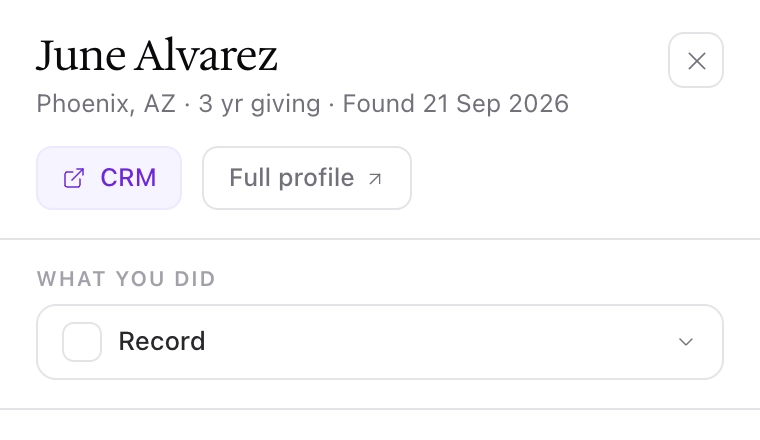
Individual donor alerts describe one person, and you work them in Action Tracking. Click a donor's name to open the donor panel, then click Full profile to open this page.
The insight callout
The triggering insight sits at the top of the profile with its key facts attached. For a lifetime giving milestone that means the gift amount, the date it was received, and the threshold that was crossed. Those three facts are shown together so that you do not have to look them up before making contact. They cover what happened, when it happened, and how significant it was.
The recommended next step
Below those facts is a recommended next step. The recommendation is written by expert fundraising consultants.
Working an alert
To work an individual donor alert:
Open Insights from the sidebar and select the alert under Donor alerts. Click the donor's name, then Full profile.
Read the insight callout: amount, date, threshold crossed.
Read the recommended next step.
Review Dataro prediction reasons to see the five factors behind the score.
Review the Donor Journey to check what preceded this moment.
Check whether anything you plan to use in your outreach is inference.
Act, then record what you did in Action Tracking, using the Done column or What you did in the donor panel. Recording an action does not update your CRM yet, so update the CRM record as well.
Frequently asked questions
Can I see why a donor scores the way they do?
Yes. Use Dataro prediction reasons on the profile, which lists the top five contributing factors. That is usually enough to see the logic behind why a donor is being surfaced to you, and if a factor looks wrong, check the underlying data before acting. A playbook or insight shows you the ranked list rather than the reasoning behind each row.
This donor's profile only shows CRM fields. Where is the research?
Enrichment happens per donor, so a profile can be complete for one person and thin for another. If research appears on other profiles, use Enrich with ProspectAI for an individual or a bulk list for a batch.
No profile in our account shows research, and we have no Research Donors tab. Why not?
Two things have to be true for the research layer to appear, and both are set for your whole organization: ProspectAI has to be enabled for your account, and Dataro has to hold donor contact details from your CRM. Research works from a donor's name and location, so an account without donor contact details has nothing to search on. Your Customer Success Manager can tell you which applies.